Washing Machine Icons: A Minimalist Design Asset for Modern Projects
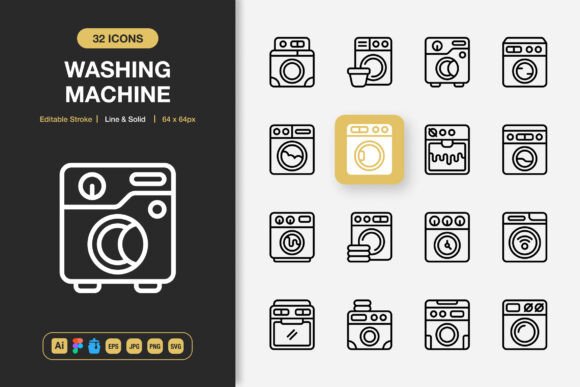
When you need a visual symbol for cleaning, laundry, or domestic services, a washing machine icon is a logical choice. But the difference between a generic, clip-art style image and a thoughtfully crafted icon set can profoundly impact your project's professionalism and usability. The Washing Machine Icons set, with its dual line and solid styles, represents more than just pictures of appliances. It's a versatile toolkit designed for clarity, consistency, and seamless integration across a vast array of media.
Many creators rush to grab free icons online, overlooking critical aspects like file formats, editability, and stylistic cohesion. This often leads to a frustrating patchwork aesthetic in their work, where icons clash with the overall design language or become unusable when a simple color change is required. Using mismatched, low-resolution icons can make a website feel amateurish, an app interface confusing, or a printed flyer visually disjointed. The initial savings in time or cost evaporate when you spend hours trying to force incompatible assets into your project.
Overlooked Details That Compromise Your Project's Quality
A common oversight is assuming an icon is just a PNG file. While PNGs with transparency are convenient for quick placement, they are static. If a client requests a color scheme change, or you need to adapt the icon for a dark mode interface, a static PNG locks you into its original form. This limitation forces you into a scramble for alternatives or a time-consuming recreation of the asset. The inclusion of fully editable source files—like the Adobe Illustrator and Figma files in this set—is not a bonus; it's a necessity for professional work. It ensures you own the design, not just a snapshot of it.
Another frequent mistake is neglecting stroke consistency. Icons drawn with varying line weights or haphazard corner radii can look jarring when placed alongside other UI elements. The Washing Machine Icons set provides a uniform, minimalist design with editable strokes, meaning you can adjust the line thickness to perfectly match your existing design system without distorting the icon's clean geometry. This level of control is what separates a disposable graphic from a durable design component.
The Hidden Cost of Incompatible File Formats
Beginners and even seasoned professionals sometimes download a set only realizing later it lacks the specific format their tool requires. You might have a perfect SVG for your web developer, but your print designer needs an EPS, and your social media manager needs a high-quality JPG. Being forced to convert files manually often degrades quality or breaks editability. A comprehensive set like this one, which includes SVG, EPS, PNG, JPG, and even organized Iconjar and Figma files, removes this technical friction. It allows different team members—from coders to illustrators to marketers—to work with the same visual asset in their native environments, ensuring brand consistency from a website banner to a printed poster.
Imagine you're creating a user manual for a home appliance. You need clear icons for the controls. Using low-quality icons could make the instructions ambiguous. With 100 customizable icons in both line and solid styles, you have the flexibility to choose a simple line icon for a schematic diagram and a bold solid icon for a prominent warning label, all while maintaining a single, recognizable family of symbols. This adaptability supports clear communication, which is the core purpose of using icons.
Practical Steps to Avoid Common Pitfalls
Before committing to any icon set, audit your project's scope. Ask yourself: Will this need to go into an app, a PDF ebook, and a t-shirt print? Check the provided file list meticulously. The presence of a source file (like the Illustrator AI file) is your guarantee of future flexibility. Also, evaluate the stylistic match. Minimalist design, as seen in these washing machine icons, isn't just trendy; it's highly functional because it reduces visual noise and focuses user attention. Ensure the icon style aligns with your project's tone—whether it's a sleek tech blog or a friendly consumer guide.
A better approach is to treat icon selection as a foundational design decision, not a last-minute decoration. Integrate the icons early in your mockups using the provided Figma file or drag-and-drop PNGs. This allows you to test their readability and aesthetic fit within your layout. If they work in your prototype, they'll work in your final product. Furthermore, the included readme file is often ignored, but it typically contains crucial instructions on editing or organizing the files, saving you from guesswork later.
Transforming Projects with Cohesive Visual Language
Choosing a robust set like Washing Machine Icons changes your projects by providing a reliable visual shorthand. For entrepreneurs and marketers, this means creating infographics and social media content that is instantly understandable, enhancing user engagement. For educators and freelancers, it means producing teaching materials or client reports with a polished, credible look. The "easy drag and drop" feature isn't about laziness; it's about efficiency, allowing you to maintain creative momentum instead of getting bogged down in asset preparation.
The ultimate goal is to enhance communication without distraction. Poor icon choices add distraction. A cohesive, high-quality set adds clarity. By investing in an asset that covers from source to output, you safeguard your time, your project's quality, and your professional reputation. Your next website, app interface, or printed banner shouldn't suffer from a disjointed visual patchwork. It should benefit from the clean, consistent, and fully adaptable language that a dedicated minimalist icon set provides.