Machine Learning Icons: The Visual Language for Modern Projects
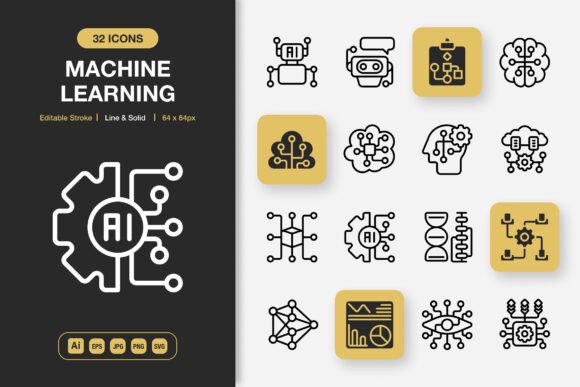
In the digital world, clarity and speed of communication are everything. Whether you’re designing an app interface, putting together a training manual, or creating a social media graphic, you need visuals that communicate complex ideas instantly. This is where a specialized set of Machine Learning Icons comes into play. It’s not just another generic icon pack; it’s a curated collection designed to represent the core concepts of machine learning—like neural networks, data training, algorithms, and prediction models—in a clear, minimalist style. For anyone working in or explaining this field, these icons become a vital shorthand.
Beyond the Tech Blog: Where These Icons Really Work
You might initially think these icons are only for AI researchers or software developers building dashboards. While that’s a perfect use, their application is far broader. Consider the educator creating an online course about data science. A well-designed icon representing a “decision tree” or “regression analysis” on a slide or infographic makes the concept more digestible than a paragraph of text. A marketer in a tech startup needs to explain their product’s ML features in a brochure or website banner. Using these icons alongside concise copy helps demystify the technology for a non-technical audience, building trust and understanding.
A freelance designer tasked with a client’s annual report might use the icons to visually segment sections discussing the company’s investment in automation and predictive analytics. Even a blogger writing about the ethical implications of AI can use these icons to break up long text and visually anchor key arguments. The utility crosses from purely digital spaces—like mobile apps and websites—into print: flyers for a workshop, posters for a conference, or illustrations in a published book.
The Practical Advantage of a Dual-Style Set
Having both line and solid styles in the same Machine Learning Icons pack is a practical decision, not just a feature list item. The line style, with its elegant, open feel, is perfect for situations where you want a lighter, integrated visual. Think of it being used within a mobile app’s UI, where it doesn’t overpower the text or functionality. The solid style, with its bold, filled forms, commands more attention. This is what you’d use on a poster header or a key banner graphic where you need the icon to stand out from a distance or on a busy background.
The editable stroke is another feature that speaks directly to real workflow. If you’re integrating an icon into a brand’s existing material, you often need to match a specific line weight or color scheme. Being able to adjust the stroke means you can make the icon feel native to your project, not just pasted in. It removes a common friction point for designers and creators who need consistency.
What a Complete File Package Means for Your Workday
When you see the list of included files—Adobe Illustrator source, EPS, SVG, PNG, JPG—it’s easy to just skim over it. But each format solves a specific, real problem. The Illustrator source file is for the deep customizer. Maybe you need to combine two icon concepts into one unique graphic for a special project. With the source, you can deconstruct and rebuild. The SVG files are gold for web and app work; they scale perfectly without losing quality, keeping your site sharp on any device.
PNG files with transparency are the go-to for most quick graphic tasks. Dropping an icon onto a social media post template in Canva or Photoshop is instantaneous. The EPS and JPG files cater to print scenarios or simpler software compatibility. The inclusion of a Readme file isn’t a throwaway; for someone new to using vector assets, it can provide the quick guidance needed to open the right file and start working without a frustrating search online. This comprehensive package acknowledges that your project might jump from a digital screen to a printed page, and you shouldn’t have to hunt for conversions or compromise on quality.
Considering Fit Before You Use Any Asset
Before applying a set like this to your project, it’s worth asking a few simple questions. First, does the visual style of the icons align with the overall aesthetic you’re building? The minimalist design here is versatile, but it should complement your project’s tone. Second, consider your audience. Are the icons instantly recognizable for what they represent? Good ML icons use metaphor effectively—a brain-like network for a neural network, gears for processing—so they should communicate quickly even to semi-technical viewers.
Finally, think about longevity. Are you creating a one-off flyer or a foundational website that will grow? Using a cohesive, high-quality set from the start means you can scale your visuals consistently over time, adding new icons from the same family as your project expands to cover more ML topics. This avoids the visual patchwork that happens when you grab random icons from different sources over months or years.
The Real-World Outcome: Saving Time and Elevating Communication
At its core, using a well-crafted set of Machine Learning Icons is about two outcomes: saving your precious time and elevating the clarity of your communication. Instead of spending hours sketching a custom icon or compromising with a generic, off-topic graphic, you have a drag-and-drop solution. That time savings translates directly into being able to focus on the content, the code, or the copy that matters most in your project.
And for the viewer, reader, or user, the benefit is clarity. A complex topic becomes approachable. A product feature becomes understandable. An educational concept becomes memorable. By providing a consistent visual language across your materials—from a website to a printed banner—you build a stronger, more professional identity. Whether you’re a creator, a business owner, an educator, or a hobbyist publishing your insights, these icons help you present your work with the authority and polish it deserves.