Why Selfie Icons Might Be Your Next Design Asset
In the crowded marketplace of digital icon sets, finding a versatile and high-quality package can feel overwhelming. Selfie Icons presents itself as a comprehensive solution, offering a set of minimalist icons designed for adaptability across a wide range of projects. Understanding its specific features, format offerings, and inherent tradeoffs is crucial for designers, developers, and content creators looking to make an informed resource decision.
Defining the Selfie Icons Approach
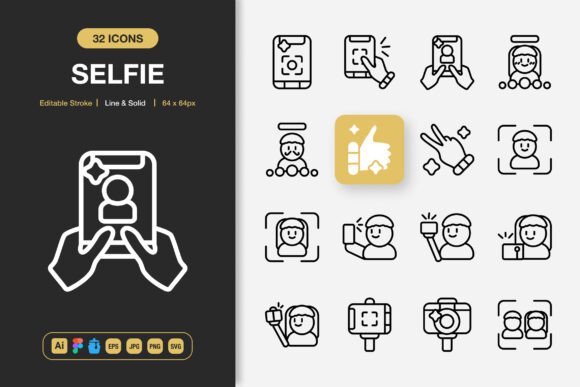
Selfie Icons is not merely a collection of images; it is a packaged design system focused on simplicity and utility. The core distinction lies in its dual presentation: each icon is provided in both a delicate line style and a more substantial solid style. This immediately doubles the application potential, allowing for quick visual tone adjustments within the same project. Furthermore, the claim of an editable stroke means that users with access to vector editing software can fine-tune weight and detail, offering a level of customization beyond static PNG files.
The included file formats are a significant part of its value proposition. From the source Adobe Illustrator file to the Figma file and Iconjar library, it caters directly to professional workflows. The inclusion of EPS, SVG, and PNG with transparency ensures compatibility from print media like posters and flyers to modern web and app development. This broad format support is designed to remove technical friction, enabling a drag-and-drop approach for users who need speed, while providing deep editing capabilities for those who require precise control.
Evaluating Fit and Application Scenarios
The promotional text suggests suitability for "any project," but a pragmatic evaluation helps identify where Selfie Icons truly shines and where other alternatives might be more appropriate.
Optimal Use Cases for Selfie Icons
This icon set appears best-fit for projects requiring a cohesive, minimalist aesthetic across multiple platforms. For instance, a startup building a website, a companion mobile app, and promotional print materials like banners could utilize the same icon family throughout, maintaining brand consistency with minimal effort. The easy drag-and-drop files and multiple formats directly support this cross-platform need.
Another strong scenario is for designers working within tight timelines or those who may not specialize in icon creation. Having access to 100 customizable icons in both line and solid styles can accelerate the prototyping phase for infographics, social media graphics, or book layouts. The provided Figma and Illustrator files mean adjustments to color or scale are straightforward, making the set a flexible starting point rather than a final, immutable asset.
Potential Limitations and Considerations
While the set offers 100 icons, the scope of those icons is not detailed. For a project requiring very niche or industry-specific symbols (e.g., detailed medical equipment or obscure technical tools), a more specialized icon library might be necessary. The minimalist design, while versatile, may not convey the required level of detail or emotional tone for projects needing rich, illustrative, or hand-drawn aesthetics.
The reliance on editable source files also implies a tradeoff. For a user without access to Adobe Illustrator or Figma, or without the skill to modify vector paths, the core benefit of customization is diminished. They would be dependent on the pre-made PNG or SVG files. In such cases, a simpler set of static icons in exactly the required sizes might be a more efficient and cost-effective choice.
Comparing Across Key Decision Factors
When evaluating icon resources, professionals typically weigh several factors: style coherence, format flexibility, customization depth, and workflow integration.
Style and Visual Coherence
Selfie Icons stakes its position on minimalist design. Compared to more ornate or skeuomorphic icon sets, this minimalist approach offers clarity and modernity, but it may lack the character or thematic fit for certain brands. It competes broadly with other minimalist families, and its advantage is the built-in variation between line and solid. This allows a designer to use line icons for a subtle interface and solid icons for stronger calls-to-action without switching asset libraries, maintaining a unified visual language.
Format Flexibility and Workflow Integration
This is arguably where Selfie Icons attempts to stand out. The simultaneous delivery of files for major design platforms (Illustrator, Figma) and development-ready formats (SVG, PNG) is a notable convenience. Compared to sets that only offer PNGs at various sizes, it provides a path from design to implementation without requiring format conversion. The Iconjar file specifically addresses organization for macOS users, a thoughtful inclusion that speaks to professional workflow pain points. However, for a user who exclusively works in a tool like Sketch or Affinity Designer, the absence of a native source file for that software becomes a minor friction point.
Customization Depth versus Immediate Use
The package invites customization, but the effort required is a key decision factor. The editable stroke and source files offer deep control, positioning Selfie Icons as a base for tailored design. This contrasts with icon sets that are offered as final, non-editable products. The tradeoff is clear: one offers adaptability at the cost of some user effort; the other offers immediate, zero-effort use but with no alteration potential. For teams that need to adjust icons to match an exact brand guideline, the customizable nature of Selfie Icons is a strong benefit. For solo entrepreneurs or marketers who need to place icons quickly and move on, the plethora of files might be underutilized.
Making an Informed Resource Selection
Choosing Selfie Icons, or any icon asset, should stem from a clear match between project requirements and package offerings.
Consider Selfie Icons if your project demands a clean, minimalist style across both digital and print mediums, and you have the software and basic skills to potentially tweak the assets. Its value increases significantly if you are operating in a multi-platform environment (web, app, print) and want to avoid managing multiple icon sets from different sources.
Look towards other alternatives if your project requires a very specific, non-minimalist artistic style, if you need a vast library of thousands of icons covering innumerable concepts, or if you work exclusively in a design tool not supported by the provided source files. Similarly, if your use case is hyper-focused—such as needing only app icons in exactly 128px PNG format—a more targeted, smaller resource might suffice.
Ultimately, resources like Selfie Icons exist to solve efficiency and consistency problems in design production. By offering a balanced set of styles and an unusually wide array of professional file formats, it aims to be a versatile toolkit. Its practicality hinges on the user's specific needs, available tools, and desired level of creative control. Assessing these factors against the set's stated features will lead to a more confident and effective design resource decision.