Introducing the Set of Shabby Skeletons
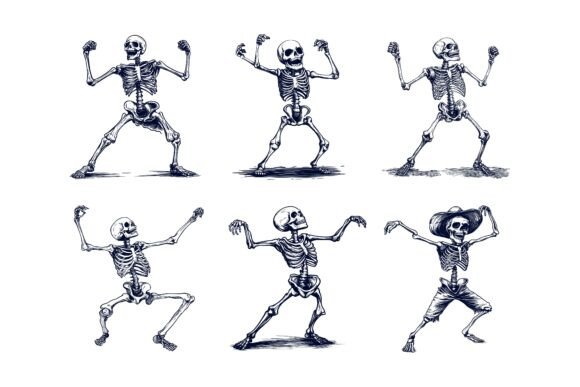
In creative projects, having a reliable, adaptable visual toolkit can make the difference between a concept that stalls and one that flows effortlessly. The Set of Shabby Skeletons is precisely that: a specialized collection of vector illustrations crafted in Adobe Illustrator format, offering a distinct, hand-drawn aesthetic with a purposefully imperfect charm.
What Exactly Is This AI EPS Collection?
At its core, this set is a digital asset pack. Each element—a skeleton illustration—is created as a vector graphic, meaning it’s built with mathematical paths rather than pixels. This technical foundation is crucial because it grants you infinite scalability and complete editability. The "Shabby" style implies a design choice: these illustrations aren’t rigidly perfect. They carry a sketched, slightly worn character that feels organic and approachable, which can add warmth and personality to designs that often default to cold precision.
The collection comes in two primary file formats: AI and EPS. These are the native formats for vector editing software, particularly Adobe Illustrator. Additionally, each design is provided as a JPG file, offering a quick, ready-to-place option for situations where immediate use is needed without editing. This dual-format approach respects both the professional who wants to dive into the layers and the casual user who needs a speedy solution.
Why This Set Stands Out for Creators
Many illustration packs promise flexibility but deliver files with messy, collapsed layers or inconsistent styling. The value here lies in the deliberate structure. The files are neatly organized, with a logical layer structure. This means when you open an AI file, you can easily isolate individual elements—perhaps a single bone or a decorative detail—without wrestling with a clumped group. This organization is a silent feature that saves hours of technical frustration.
Perfection in details and consistency across the set ensures that if you use multiple skeleton illustrations together, they will feel like part of a unified family. This coherence is vital for building a visual identity across a project, whether it’s a series of blog graphics or a set of app icons. The editability is equally significant. You can change colors, modify line weights, rearrange components, or combine elements to create entirely new icons. The power to adapt the asset to your exact need, not the other way around, is a key professional benefit.
Practical Applications Across Fields
The suitability for both print and web opens a broad spectrum of use cases. For a small business owner or marketer, these illustrations could become the signature visual for a Halloween campaign, used in social media posts (web), flyers (print), and even merchandise mockups. Their shabby style can convey a fun, non-corporate vibe.
Educators and freelancers might incorporate them into presentation slides, worksheets, or educational infographics to make anatomical or historical topics more engaging. The vector format ensures crisp clarity even when projected on a large screen or printed on a poster.
For bloggers and hobbyists running a personal site or crafting digital art, the ease of color modification means the skeletons can be adapted to match any site palette or personal artwork theme. Imagine quickly turning a skeleton illustration from its default tones to pastel colors for a spring-themed article about renewal, or to dark blues for a nautical concept.
In the digital product space, their utility as symbols and assets for apps and infographics is clear. A developer or UI designer could scale these vectors down to perfect icon sizes for a mobile application without any loss of quality, using the shabby aesthetic to give an app a unique, artisanal feel.
Important Considerations Before Using
While the set is designed for both Mac and Windows users, it’s essential to have access to software that can read AI or EPS files for full editing. Adobe Illustrator is the primary tool, but other vector programs like Affinity Designer or CorelDRAW can also handle these formats. If you only have access to basic image editors, you’ll primarily rely on the provided JPGs, which are useful but limit the customizability.
Think about your project’s tone. The "Shabby" aesthetic is a specific style. It works wonderfully for projects seeking authenticity, a handmade look, or a touch of whimsy. It might be less suitable for projects requiring ultra-modern, sleek, or clinically precise visuals. Assess whether this particular character aligns with your brand or message.
Lastly, leverage the organized file structure. Take a moment to explore the layers when you first open a file. Understanding how the designer built the illustration will empower you to edit it more efficiently. Don’t just treat it as a flat image; treat it as a customizable construction kit.
Moving from Idea to Implementation
The journey from downloading a resource to integrating it into your work is where value is realized. With this Set of Shabby Skeletons, that process is streamlined. You can start simple: place a JPG file into a document to instantly elevate a layout. As you grow more confident, open the AI file. Change a color to see how it feels. Isolate an element and use it alone as a subtle background pattern. Combine two skeleton illustrations to create a new scene.
This collection removes the barrier of having to draw everything from scratch while preserving your creative authority. It supports a wide range of goals—from speeding up a client’s project deadline, to adding visual interest to a personal blog, to developing a cohesive set of icons for a new venture. Its cross-platform compatibility and multi-format delivery mean it’s ready for your environment, whatever your level of technical expertise.
The ultimate appeal of this AI EPS illustration set is its balance of ready-made utility and open-ended potential. It offers a distinctive style, professional-grade file construction, and the freedom to make the assets truly yours. For creators across disciplines looking to inject a specific, editable character into their visual communications, it represents a practical and powerful resource.